Diagram
 OneDrive
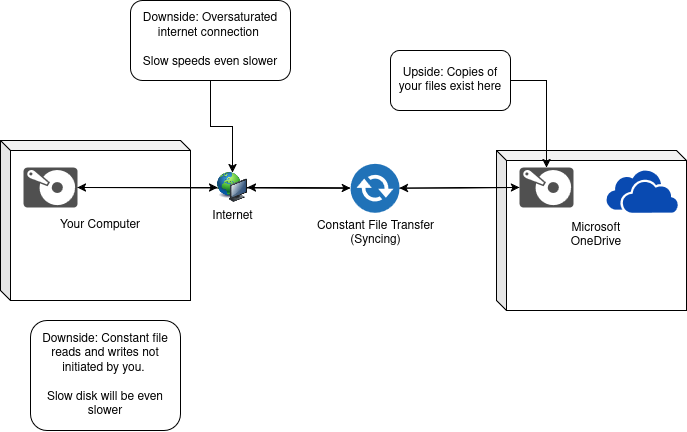
The upsides and downsides to integrating a cloud storage system into your most-used directories.
OneDrive
Some day, your hard drive is going to fail. Every computer, every server, every data center, is constantly dealing with failed drives.
On that day, you will ask yourself, "Did I make a copy of the files I care about?"
If you use OneDrive and run with the defaults like Microsoft would like you to, the answer is "Yes, for certain locations".
As of this writing, those locations are
The next question: Can you remember how to get into your Microsoft account?
Word, Excel, and Powerpoint will constantly attempt to keep the file you are working on "safe" on a server somewhere associated with your Microsoft account.
Often times, this feature helps save us from ourselves. The file we forgot to close before shutting down our PC is recoverable.
Many backup solutions copy your files to one disk. One copy of the file is located on your hard drive, one copy is located on the backup hard drive.
The way any decent cloud storage solution is configured relies on disks stored in 3 or more seperate physical locations known as "Availability Zones" that have enough information to restore your file should one of the locations be destroyed or experience failure.
Disclaimer: I am not, nor have I ever been a Microsoft engineer, but I would bet money this is what OneDrive looks like for anyone able to look under the hood.
The function of a hard drive is to read and write data.
Reading and writing more data to an external location will require increasing the usage of your hard drive.
For modern solid-state drives (SSD), the additional load will go almost unnoticed.
For older, hard-disk drives (HDD), the additional load may not.
The function of memory and cpu is loading and executing instructions.
OneDrive.exe is another set of instructions that requires almost constant execution.
For systems with modern, multi-core processors and plenty of extra RAM, the additional load will go almost unnoticed.
For older, single-core processors with limited RAM, the additional load may not.
The function of a network is transmitting and receiving data.
OneDrive.exe will require a constant transfer between your computer and Microsoft servers.
For modern, high-bandwidth internet connections the additional usage will go almost unnoticed.
For older, limited connections, the additional usage may not.
Should you use OneDrive? Just like the answer to most complex questions, "it depends". On a practical level, if
If, on the other hand, your computer was less expensive and/or is older, and your internet connection is on the slower side, I would not recommend OneDrive (or any cloud storage provider). Invest in a good external hard drive, and make copies of the files you care about.
Do I use OneDrive? Yes, and No. I leverage whatever cloud provider a client provides access to, so if that happens to be OneDrive, I will use OneDrive as my off-site backup solution for my most critical files. When I do leverage OneDrive I intentionally disable the default backup locations and instead hand-select which directories I periodically back-up. I have had poor end-user experiences with all "clients" that purport to automate the backup process (including NextCloud, Google Drive, and OneDrive).
Ready to solve your IT challenges? Reach out to discuss your needs!